Audio Quote Machine
An FCC drum-machine build reskinned as a fictional hardware audio interface, swapping drum hits for anime and movie quote clips.
Timeline
Short solo build
Role
Frontend Developer
Team
Solo
Status
CompletedTechnology Stack
Key Challenges
- Building convincing "hardware" visual details (status LEDs, scanlines, corner brackets) with layered CSS instead of image assets
- Handling audio replay cleanly so rapid or repeated key presses restart a clip instead of stacking playback
- Meeting freeCodeCamp's strict id/structure requirements for #drum-machine, #display, and each .drum-pad without that constraint showing through in the final look
Key Learnings
- Wiring both click and keydown/keyup input to the same trigger function without duplicating logic
- Using CSS gradients, box-shadows, and keyframe animation to fake a physical device skin
- Keeping a small piece of playback state (currentAudio) to coordinate interruption between HTML5 audio elements
- Working inside an automated test suite (the FCC testable-projects bundle) as a constraint rather than an afterthought
Audio Quote Machine
Overview
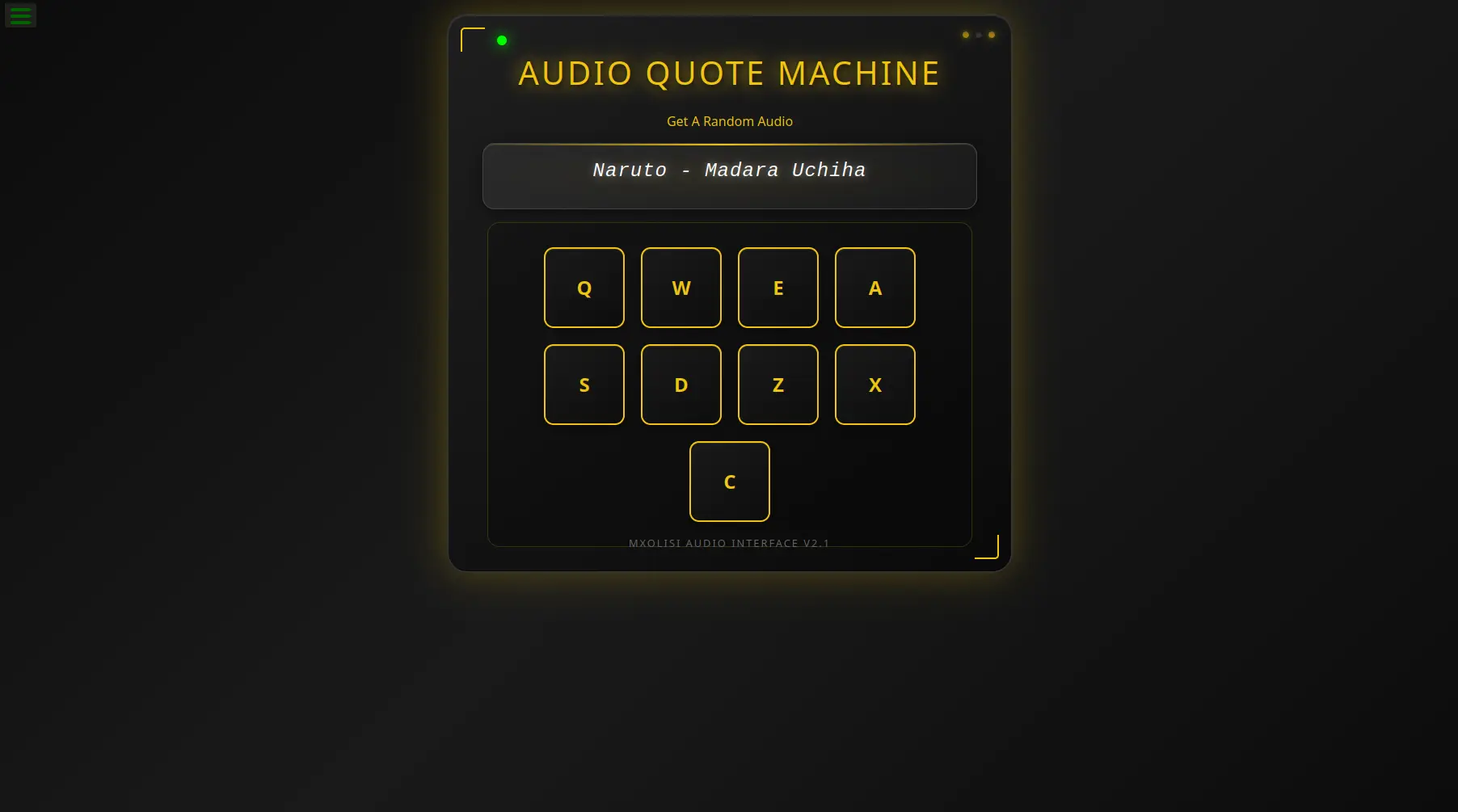
This is freeCodeCamp's Front End Libraries "drum machine" project, but reskinned end to end: instead of drum hits, the nine pads trigger quote clips from anime, movies, and a GOT scene, and the whole thing is dressed up as a standalone piece of hardware called the "MXOLISI AUDIO INTERFACE v2.1" rather than a plain grid of buttons on a webpage.
Why I built it
The FCC brief is deliberately narrow: nine pads, unique ids, keyboard and click triggering, a display that updates per pad, and a passing test suite. That narrowness is the point of the exercise, but it also left room to spend the actual effort on making it look like something rather than just satisfying the user stories. I used it as a chance to practice building a convincing visual identity out of nothing but CSS, and to swap in content that actually made me want to press the buttons.
Core features
Quote pads, not drum pads: nine keys (Q, W, E, A, S, D, Z, X, C) each map to a specific line, Erwin Smith from Attack on Titan, Bane's Dark Knight monologue, Cersei Lannister, Alphonse Elric, Itachi and Madara Uchiha from Naruto, Johan Liebert from Monster, and Thorfinn from Vinland Saga, with the display updating to name the source on every trigger.
Dual input: every pad responds to both a click and its mapped key, routed through the same play() function so there's one source of truth for playback and display logic instead of two parallel code paths.
Interrupt-on-repeat playback: pressing a new pad stops and rewinds whatever's currently playing before starting the next clip, so mashing keys doesn't layer overlapping audio.
A device skin, not a webpage: pulsing status lights, a glowing power LED, a scanline sweeping across the display, and bracket details at the container's corners, all built with layered gradients, box-shadows, and CSS keyframes rather than any image assets.
Tech stack
Plain HTML5, CSS3, and ES6 JavaScript, no framework or build step. Bootstrap 5 is pulled in for base layout and its card component, then almost entirely overridden by custom styles for the device look. The freeCodeCamp testable-projects-fcc bundle runs the official test suite against the page. Deployed as a static site on Vercel.
Technical highlights
One trigger function, two inputs
Each pad's onclick and the document-level keyup listener both call the same play(str) function. keyup uppercases whatever key was pressed and checks it against the string "QWEASDZXC" before dispatching, so keyboard and mouse input can never drift out of sync with each other.
A single audio-state variable doing the interruption work
Rather than tracking play state per <audio> element, script.js keeps one currentAudio reference. On every trigger it pauses and resets whatever that variable points to, then plays the new clip and reassigns the reference. It's a small amount of state, but it's exactly enough to stop clips from overlapping without needing to touch every audio element on each keystroke.
Faking hardware with CSS alone
The status lights, power indicator, and corner brackets are all pseudo-elements and small fixed-size divs animated with @keyframes pulse and @keyframes power-pulse. The scanline across the display is a ::before gradient bar animated with translateX. None of it is an image, it's the kind of detail that's cheap to build once you commit to doing it in CSS rather than reaching for an asset.
Challenges
The FCC test suite is strict about structure, specific ids on #drum-machine and #display, a fixed .drum-pad order, ids on the <audio> elements matching their parent pad's inner text, and all of that had to survive being wrapped in a much heavier visual treatment without breaking. Getting the "device" details (LEDs, scanline, brackets) to read as intentional rather than gimmicky took more passes on the gradients and shadow values than the actual JavaScript did.
What I learned
This one was less about JavaScript complexity and more about discipline within a constraint: the interaction logic here is genuinely small, one function, one state variable, one event listener, and the interesting work was in how much visual identity that small amount of logic could support. It was also useful to build against an existing automated test suite rather than just my own manual clicking, since it forces the DOM structure to stay exactly right even as the styling changes underneath it.
Looking ahead
The pad-to-clip mapping is hardcoded in script.js via an if/else chain; pulling that into a small array or object of { key, clip, label } would make it easier to swap in a different quote set without touching the trigger logic. A volume or mute control would also fit the "hardware interface" framing well.
Final thoughts
A constrained exercise is still worth doing properly. The freeCodeCamp brief gives you the bare minimum shape of a working app; everything that makes this one feel like a specific thing, quotes I actually like, an interface that looks like it has weight to it, came from treating the constraint as a floor rather than a ceiling.